
Home » Download
Get the BD10 App for Fast Mobile Play, Live Cricket, and JILI
Quick, secure BD10 app download with fast access for local mobile users
Move from browser taps to instant play with a BD10 app download. The app is light, quick to open on mobile data, and built for match days. Track live cricket markets, spin JILI slots with low lag, and manage your account without switching tabs.
Install once, then enjoy faster logins, push alerts, and cleaner menus on the BD10 mobile app. Updates keep features current, so odds load fast during toss, wickets, and powerplays. Keep your device storage free while staying ready for every over.

Why the BD10 app suits fast play, live cricket, and daily check-ins
The app trims extra steps so you can get in, place, and move on. It’s tuned for short sessions, quick swipes, and reliable performance on everyday devices.
One-tap start and data-smart performance
The app caches key screens and icons, so it opens quickly on regular mobile data. Menus and bets load with fewer images, helping reduce data use over time.
Live cricket markets that refresh at the right moments
Track overs, wickets, and partnerships while odds refresh promptly. Quick bet slip access helps you act during toss, bowling changes, and death overs.
Fast JILI slots and mobile-optimized providers
Popular JILI titles open quickly and keep animations smooth on mid-range phones. Game lobbies are simplified, so you reach your favorites in fewer taps.
Trusted access with BD10 login options
Stay signed in with PIN, fingerprint, or face unlock where your device supports it. Auto-fill for BD10 login helps you get back to live markets faster.
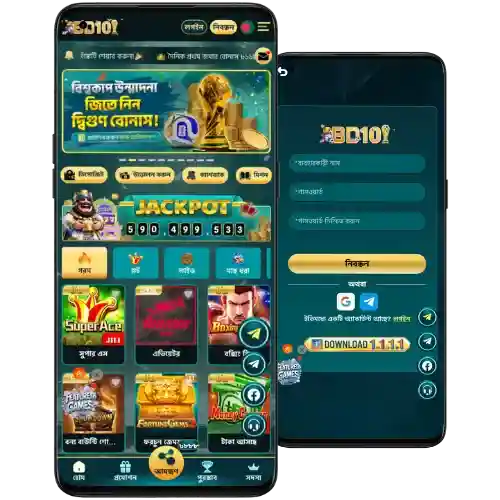
Step-by-step guide to download, install, and sign in on your phone
Use this quick guide for BD10 app download on Android or iOS. Android users can get the BD10 apk directly, while iOS users install via the App Store flow.
- Open the BD10 official site in your mobile browser.
- Choose your platform: Android (APK) or iOS (App Store).
- Tap Download and confirm the file save (Android) or tap Get (iOS).
- Android only: Go to Settings and allow install from this source when prompted.
- Tap the APK to install (Android) or wait for the app to finish installing (iOS).
- Open the app from your home screen.
- Sign in with your details or create a new account inside the app.
- Enable notifications so you never miss cricket odds updates or promo alerts.
- When prompted, accept updates to keep features and security current.
New to BD10? Use BD10 Register to create your account in minutes. Verify your details so your account name matches your payout method before you play.
Get the app on Android and iOS with quick one-tap access buttons
Android: Tap “Download for Android” to get the APK now and install with a few taps.
iOS: Tap “Get on the App Store” to add the app to your iPhone and sign in.
If buttons don’t load in your browser, go to the BD10 Official Website to download the latest app version.
Mobile features built for speed, clarity, and everyday sports-first use
- Faster entry: Open to your last screen and place bets with fewer taps.
- Clean menus: Clear tabs for Sports, Live, Casino, and JILI favorites.
- Smart bet slip: Quick edits, auto-accept options, and crisp odds display.
- Push alerts: Get timely updates for toss, wickets, and line changes.
- Face/Fingerprint login: Device-level security for rapid access.
- Low data mode: Optimized images and caching for regular mobile networks.
- Compact size: Small install footprint to protect your storage.

In-app promotions, reload deals, and alerts tailored for local players
Open the app to see live promos, time-limited boosts on big cricket fixtures, and slot missions from JILI. App users often get early alerts, so you can claim before caps are hit.
Watch for reload deals, free bet coupons, and a clear path to the BD10 welcome offer. You’ll also find ongoing BD10 bonus updates and seasonal campaigns delivered by push notifications.
Safe installation habits, official sources, and update checks for every device
Download only from the BD10 official site or your phone’s store. Avoid links shared in random groups. Check the file name and version before installing.
When Android prompts for permissions, read them carefully. The app should ask only for what’s needed, like notifications and storage for updates.
Confirm the developer name and app certificate details match BD10. Keep auto-updates on to receive security fixes quickly.
Verify your profile details early. Make sure your account name matches the name on your chosen payout method to avoid delays at withdrawal time.
FAQ about downloading, installing, and using the BD10 app on mobile
Is the BD10 app free to download and use?
Yes. The app is free to download and install. Data charges may apply from your mobile provider while browsing and playing.
How do I allow APK installs on Android?
After tapping the APK, Android will prompt you to allow installs from this source. Open Settings from the prompt, toggle it on, return, and continue.
Can I use the app on iOS devices?
Yes. Choose the iOS option and follow the App Store flow. After install, open the app, sign in, and enable notifications.
How do I update to the latest version?
Open the app to accept updates when prompted. On iOS, visit the App Store Updates tab. On Android, re-download the latest APK when notified.
Is the app safe and verified?
Yes. Install from official sources only. Check the developer name, read permissions, and keep updates on for ongoing security improvements.
Download the app now and play faster with trusted mobile access
Install the app to track live cricket odds, open JILI slots quickly, and manage bets in seconds. Keep alerts on, so you’re first to react when lines shift.
Ready to move faster than the browser? Get the app, sign in, and enjoy smarter mobile play with clear menus, quick bet slips, and dependable performance every day.