
Home » Register
Register Your BD10 Account for Fast Mobile Play and Local Payouts
Quick account creation on BD10 with trusted checks and mobile-first onboarding
Want to BD10 register on your phone in minutes? Share a few details, confirm your number, and you’re ready to explore cricket markets and JILI slots. Your profile is protected by verification and name-match checks designed to keep your balance safe.
Prefer quick access with strong security? Start on the BD10 Official Website or use the BD10 app to finish sign-up on mobile data. Your info is encrypted, and support is on hand if you need help at any step.

Why creating a BD10 account now makes everyday play faster and safer
Registration unlocks faster logins, verified payouts, and a feed that fits what you like on mobile.
Fast mobile access with light pages that load well on data
BD10 is built for phones. Pages load quickly, buttons are clear, and you can move from sign-up to play without long forms.
Verification that protects your funds and matches your payment name
Real-name and number checks help prevent misuse. When your profile name matches your wallet, payouts run smoother.
Cricket-first experience with quick markets and smart shortcuts
Shortcut views for popular leagues make it easy to back your picks. Set favorite teams to see key markets first.
JILI slots and more studios studios, once your account is live
Get access to JILI slots plus other leading providers. Try demo info, check RTP details, and add favorites for later.
Helpful support and clear status updates during sign-up
Track verification status from your profile. If something’s missing, you’ll see what to fix and how to resend.
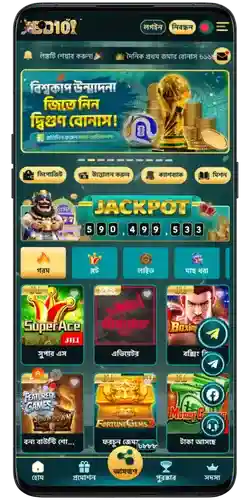
Step-by-step guide to sign up on BD10 using your phone in minutes
- Open the BD10 official site in your browser or launch the BD10 app.
- Tap the Register button on the top of the screen to start.
- Enter your mobile number, create a strong password, and add a referral code if you have one.
- Confirm the SMS OTP to verify your number and continue.
- Fill your profile: full name (as on your ID), date of birth, and an active email.
- Agree to the terms, submit the form, and wait for the quick approval message.
What the register button does and the short form you’ll complete
Tap the BD10 Register button to open a short form built for mobile screens. You’ll enter your phone, set a password, and confirm an OTP. Next, add your full legal name and date of birth so support can verify you quickly.
Have these ready to speed things up: your active mobile number, a working email, and your legal name exactly as on your ID. If extra checks are needed, you may be asked for a quick ID photo. Matching details help with smooth withdrawals later.
How to log in once your account is approved
Open the site or app, tap Login, enter your phone and password, then confirm if prompted. Save your device for faster BD10 login next time.
Deposits and withdrawals for local wallets after sign-up
Once verified, you can add funds and request cash-outs using popular local options like bKash, Nagad, and Rocket. Keep your profile name the same as your wallet name to avoid payout delays.

Smart setup tips so your new BD10 account stays secure and payout-ready
Match your profile name with your wallet and bank details
Use your legal name exactly as on your ID and wallet. This helps payments pass checks without back-and-forth.
Create a strong password and protect your OTPs
Use at least 12 characters with letters, numbers, and symbols. Never share OTP codes. Change your password every few months.
Enable extra security on your phone and account
Turn on device screen lock and in-app security prompts. Log out on shared devices and avoid public Wi‑Fi for approvals.
Set spending limits and alerts that fit your style
Choose daily or weekly limits that keep you in control. Turn on push or SMS alerts for login, deposit, and payout updates.
Install the app for faster access and fewer data dropouts
Download the BD10 mobile app to log in quicker, get match alerts, and keep play stable on mobile data.
Advantages you unlock after registering, from cricket odds to JILI slots access
Cricket markets tailored to your picks and match schedule
See key leagues first, use quick bet options, and track live scores while you place your selections.
JILI slots plus a wide catalog ready on mobile
Open JILI favorites and explore more studios with smooth loading and quick category filters for phone screens.
Personalized lobby, saved favorites, and faster actions
Your lobby remembers teams, games, and bet sizes you use most. Less tapping, more playing.
Bonuses and offers curated for new and active members
Check the promo center for BD10 bonus updates and claim the BD10 welcome offer when eligible. Terms apply and are shown clearly before you opt in.
Full access to payment tools after verification
See your limits, track history, and manage withdrawals with clear status updates. Local wallet support appears once your account is verified.
FAQs about register your BD10 account and getting started with mobile play
What do I need to create a BD10 new account?
You’ll need a mobile number, a secure password, and also your legal name. Moreover an email helps with recovery. ID may be requested for verification.
How long does approval usually take after I sign up?
Most accounts are approved shortly after OTP confirmation. If extra checks are needed, you’ll get a prompt with what to upload.
Can I open a BD10 account using only my phone number?
Yes, start with your number and OTP. You’ll add your name and other basics to complete the profile and unlock all features.
Why must my account name match my payment wallet name?
Name matching helps prevent fraud and speeds up payouts. If names differ, withdrawals may be paused until details are corrected.
How do I install the BD10 app after registration?
Visit the app page from the site, download, and follow on-screen steps. Log in with your phone and password to sync your profile.
Ready to open your BD10 account and start playing on mobile today
Join in minutes and get a mobile-first experience built for quick actions, verified payouts, and trusted support. Cricket markets and JILI slots are ready when you are.
Create your account now on the BD10 official site or the app. Keep your details accurate, confirm your OTP, and enjoy faster, smarter play every time you log in.